Know what to reorder before you run out
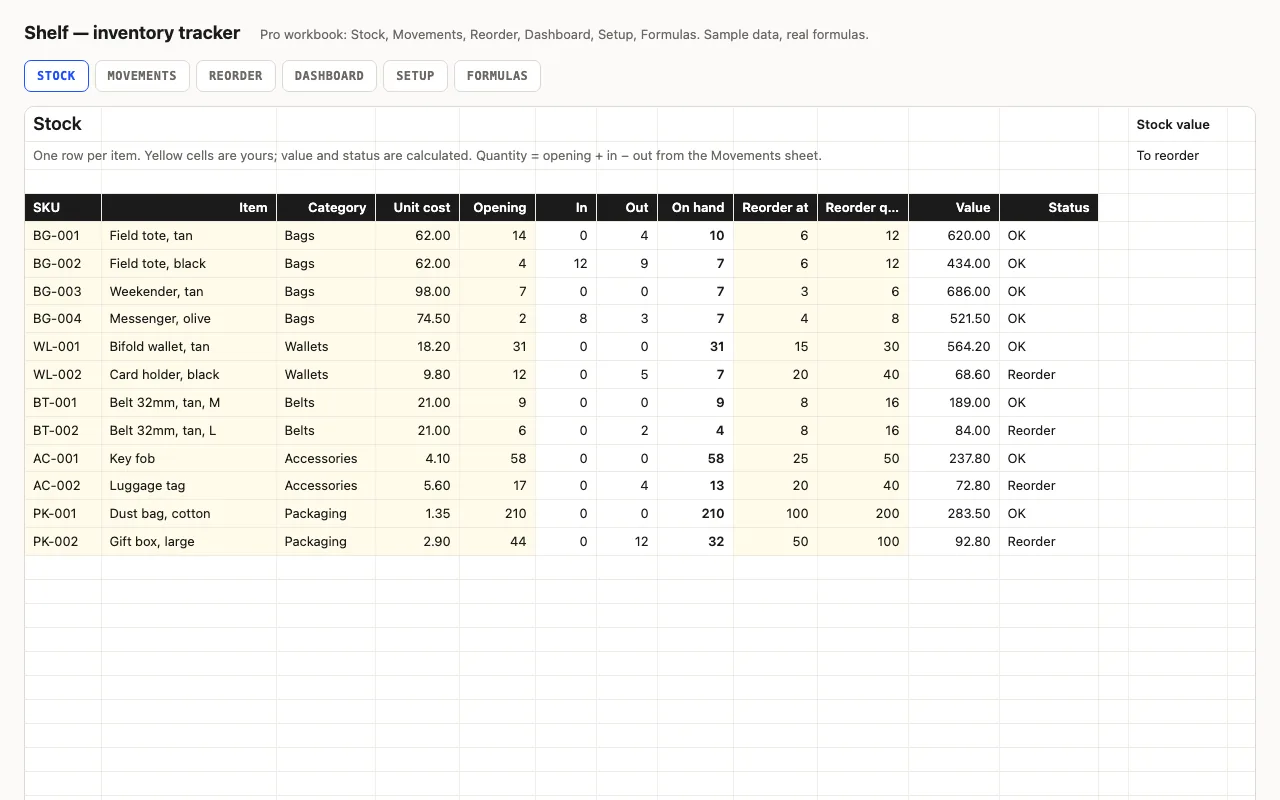
Each item has a reorder point and a reorder quantity. Status is a nested IF you can read:
nothing left → Out of stock, at or below the point → Reorder, otherwise OK — and conditional
formatting colours the word. The totals at the bottom and the top give stock value and how
many items need ordering.
Pro: log movements, and the counts keep themselves
Type every receipt and sale on Movements — the SKU is a dropdown, and the sheet names the item
beside it or says “unknown SKU” in red. Stock’s on-hand column becomes opening + in − out. The
Reorder sheet shows only the rows that need ordering, with the cost to restock; the Dashboard
breaks value and health down by category. Physical count? Type it into Opening and clear the
old movements.
No FILTER, on purpose
The Reorder sheet mirrors Stock row by row with an IF, rather than using the FILTER function,
so it works in Excel 2016 and Numbers, not just Microsoft 365. The Formulas sheet explains the
trade-off.
Checked, not just built
The build recalculates the workbook in LibreOffice and in a second, independent engine on the sample stock and movements and compares
thirteen values — on-hand after movements, stock value, reorder count, restock cost, value by
category — against numbers computed outside Excel.