foldout
Free + Pro 5-sheet workbook no macros

Nest — savings goals and net worth spreadsheet

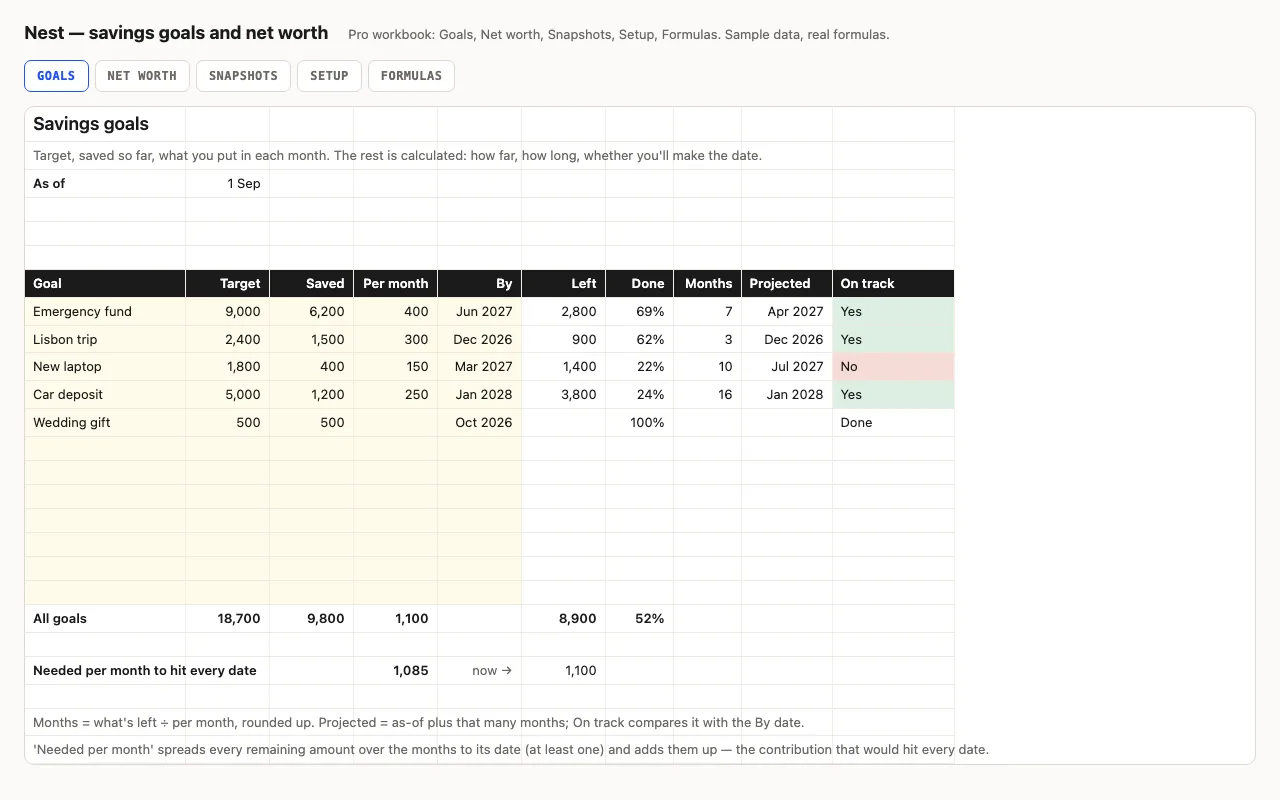
Each savings goal gets a target, what you've saved and what you put in monthly; the sheet works out what's left, months to go, the projected date and whether it beats the date you wanted — plus the contribution that would hit every date. Pro adds net worth by account and type, and twelve months of snapshots with the change month by month. No macros.

  • XLSX
  • No macros
  • EDATE
  • SUMIF
  • SUMPRODUCT
  • Google Sheets

The sheets

  1. 01
    Goals

    Twelve goals: target, saved, per month, by-date. Left, % done with bars, months to go, projected date (EDATE), on track — green, red, or 'No contribution'. Totals, and the monthly contribution that would hit every date.

    Free + Pro
  2. 02
    Net worth

    Accounts with a type from Setup; liabilities typed negative. Assets, liabilities, net worth, debt-to-assets; balance and share by type with bars.

    Pro
  3. 03
    Snapshots

    Twelve month-end balance columns per account; assets, liabilities, net worth and change per month; 12-month and average change.

    Pro
  4. 04
    Setup

    As-of date, accounts with type, types with asset or liability.

    Pro
  5. 05
    Formulas

    Nine formulas explained: the months and projection, the needed-per-month SUMPRODUCT, SUMIF across a row by the kind line.

    Pro

Built for

  • Excel 2016+
  • Google Sheets
  • Numbers

Every workbook is recalculated in LibreOffice and by a second, independent formula engine on the sample data; the totals are compared with numbers worked out outside any spreadsheet, and every formula cell is scanned for errors. We don't run Excel itself on the build machine, so this says built for, not tested in — open the live preview to see the numbers the formulas produce.

What that means app by app: in Google Sheets, in Apple Numbers, in LibreOffice Calc.

Pro

$5

Every page, the Pro-only pages, the source files, no attribution, and 12 months of updates and email support.

Goals with months to go, projected date, on track
yes
Contribution needed to hit every date
yes
Net worth by account and type
yes
Twelve months of snapshots with change
yes
Formulas walkthrough sheet
yes
Credit line on the sheet
not required
Updates and support
12 months, email

Licence

Use it for unlimited personal and commercial purposes, including client work.
Do not resell the spreadsheet itself, alone or in a bundle.

Full licence terms →

Goals that tell you the date

A savings goal has four numbers you know — target, saved, monthly contribution, the date you want it by — and three you want: what’s left, when you’ll get there, and whether that’s in time. The sheet gives the three: months to go is what’s left over the contribution, rounded up; projected is the as-of date plus those months; on track is green when projected beats the date. A goal with no contribution says “No contribution” instead of dividing by zero, and a funded one says Done.

One more number, at the bottom: the monthly contribution that would hit every date. Each remaining amount spread over its months, added up — one SUMPRODUCT. Compare it to what you put in now.

Pro: what you’re worth, and the trend

Net worth is the list of accounts with a balance each — liabilities typed negative — and a type from Setup that says asset or liability, so net worth is a sum and the split is a SUMIF. Snapshots keeps twelve months of those balances, one column per account, and works out assets, liabilities, net worth and the month’s change; a kind line above the header lets SUMIF split each row without a formula per account.

Checked, not just built

The build recalculates both workbooks in LibreOffice and in a second, independent engine and compares thirty-nine values — months and on-track for goals that make and miss their dates, the needed-per-month total, assets, liabilities and net worth, specific snapshot months and their change — against numbers computed outside Excel.
Free download

  • nest.xlsx · Goals sheet
  • README.md · LICENCE.txt

Pro download

  • nest-pro.xlsx · Goals, Net worth, Snapshots,
  • Setup, Formulas
  • README.md · LICENCE.txt (Pro)

Read before you build

Version history

  • 1.0.02026-09-13

    First release

  • 0
    macros
  • 9
    formulas explained
  • 39
    checks the build runs
  • 12
    months of history

Related spreadsheets

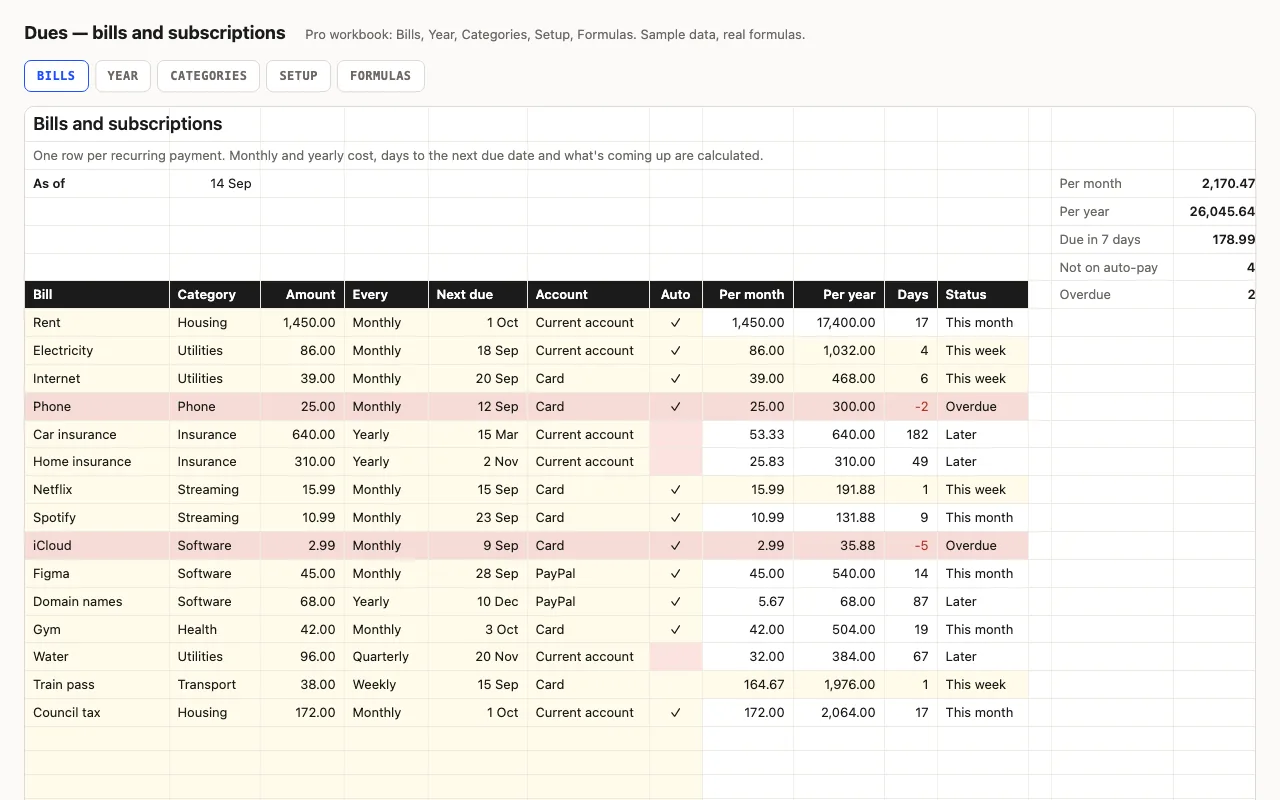
Dues — bills and subscriptions tracker spreadsheet preview

One row per recurring payment with its amount and frequency; the sheet turns them into a monthly and yearly cost, counts the days to each next due date, and flags what's overdue and due this week. Pro lays every bill across the next twelve months so the expensive months show, and totals by category. No macros.

  • XLSX
  • No macros
  • INDEX/MATCH
live demo →
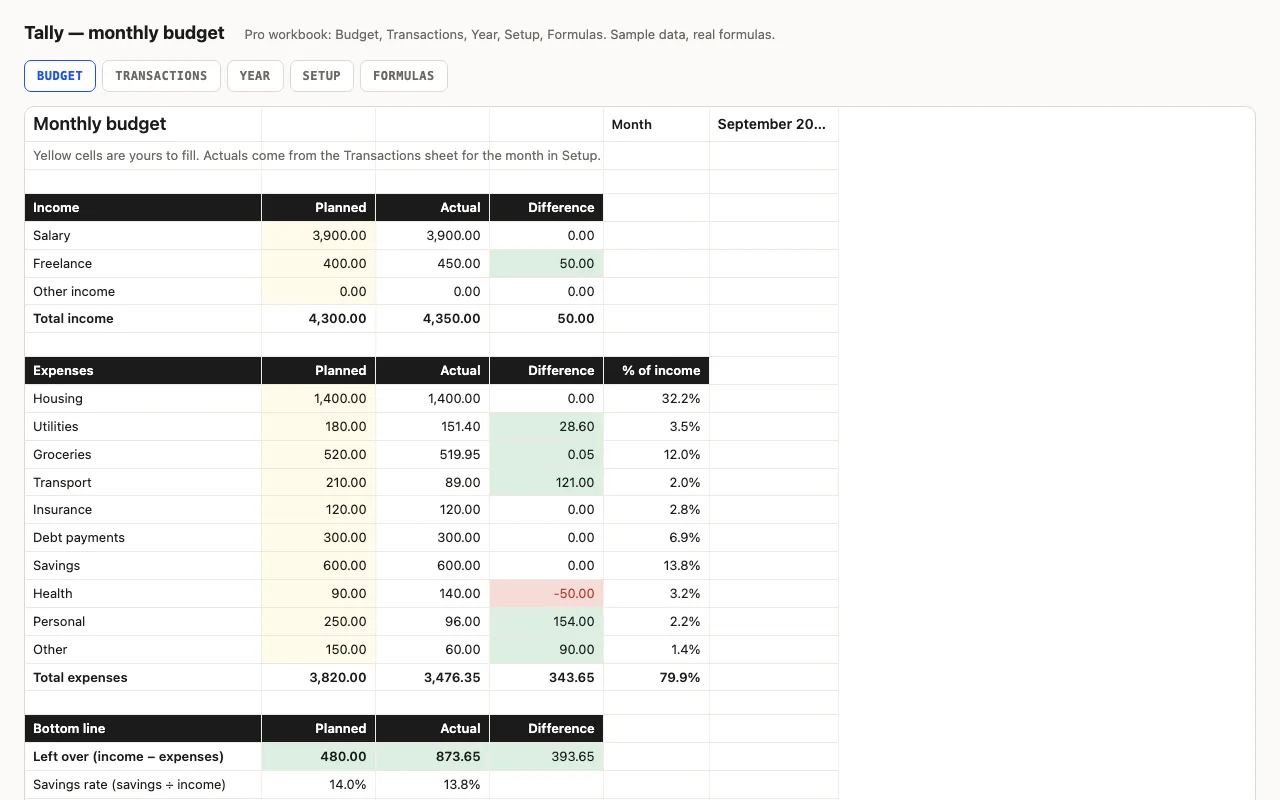
Tally — monthly budget spreadsheet preview

A monthly budget for Excel and Google Sheets with every formula visible: planned vs actual by category, red/green differences, savings rate. Pro adds a transactions log that fills the budget automatically, a twelve-month view with a chart, and a sheet explaining each formula.

  • XLSX
  • No macros
  • SUMIFS
live demo →
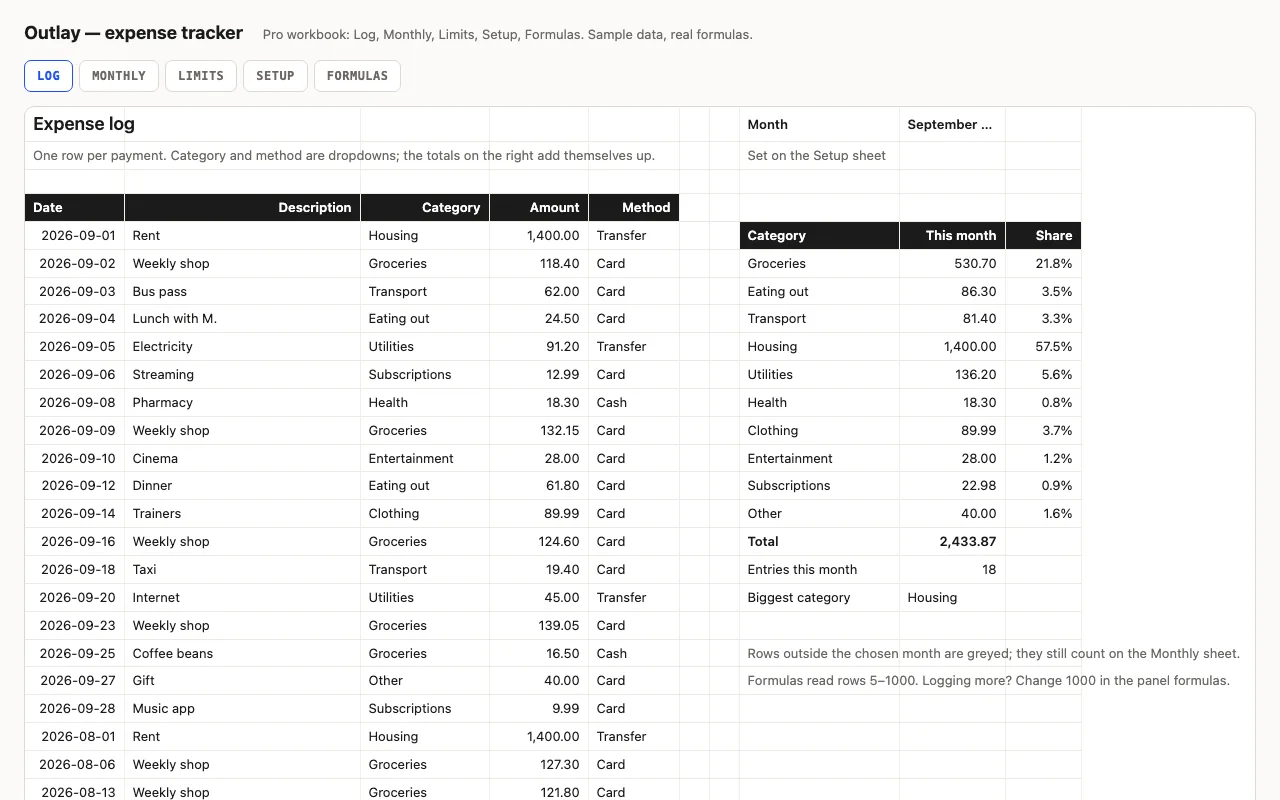
Outlay — expense tracker spreadsheet preview

An expense log for Excel and Google Sheets that totals itself: this month by category with data bars, twelve months back, and spending against the limits you set — every formula visible. Pro adds the Monthly and Limits sheets, a Setup sheet with limits, and a formulas walkthrough.

  • XLSX
  • No macros
  • SUMIFS
live demo →

Tell us what happened

Goes straight to a person. No account, no ticket number.

What is this about?

We keep the message and the page it came from. Nothing else — not your IP, not your browser. Privacy.