Every bill as a monthly number
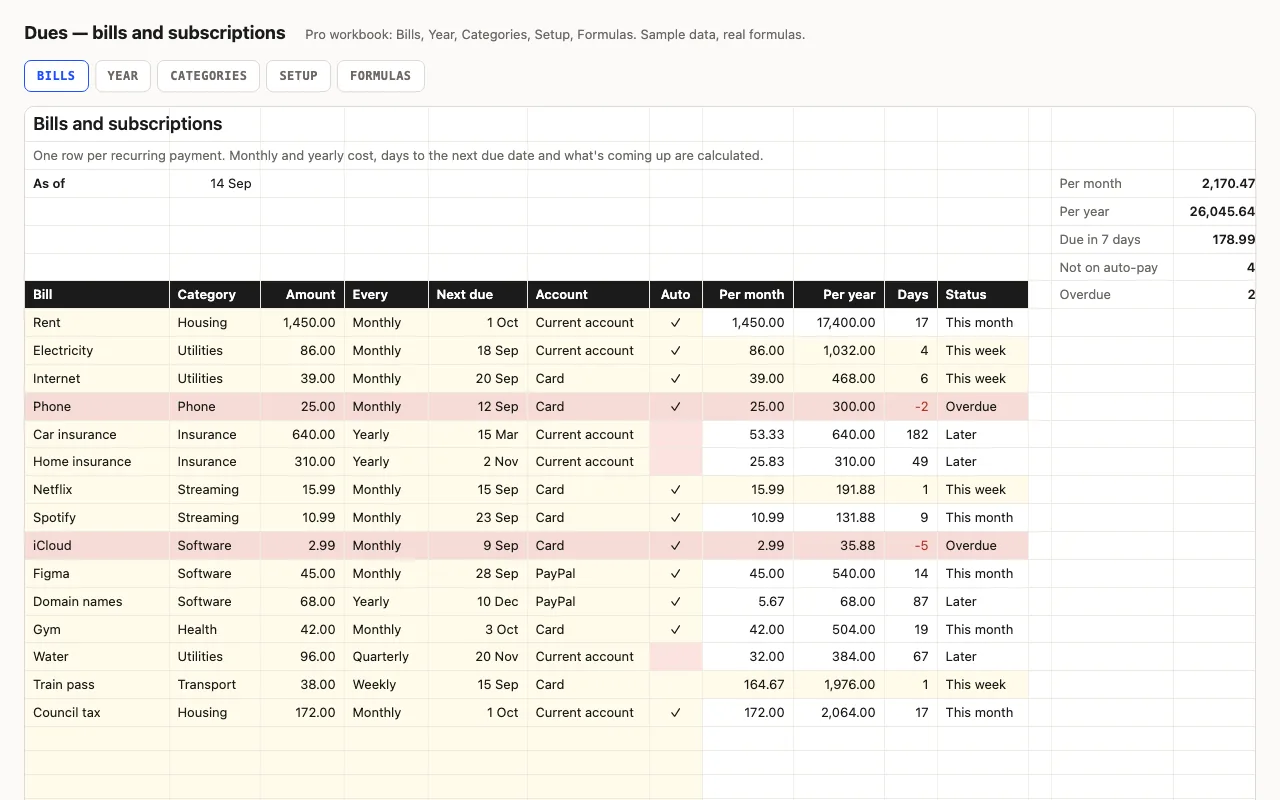
Rent is monthly, insurance is yearly, water is quarterly, the train pass is weekly. To know
what your fixed costs are, they have to be on one scale. Each bill’s amount is multiplied by
a factor for its frequency — 1, 1/12, 1/3, 52/12 — looked up on Setup, and “Per month” and
“Per year” fall out. Days to the next due date and a status against the as-of date tell you
what’s overdue and what’s due this week; bills without a ✓ in Auto are tinted, because those
are the ones you have to remember.
Pro: the year ahead, by bill
The monthly equivalent hides something: the yearly insurance bill doesn’t cost a twelfth
in March, it costs all of it. The Year sheet lays each bill across the next twelve months
as it actually falls — monthly always, yearly in its month, quarterly every third month
from its next due date — and totals each month with a bar and a “vs average” line, so the
renewal months stand out before they arrive. Categories totals by category with shares,
and calls out subscriptions and what isn’t on auto-pay.
Checked, not just built
The build recalculates both workbooks in LibreOffice and in a second, independent engine
and compares forty-three values — monthly equivalents for each frequency, days and status
across the bands, due-in-7-days, specific Year cells for the yearly and quarterly bills and
the monthly totals, the category sums — against numbers computed outside Excel.