Debt payoff calculators are usually a black box: type the debts, get a date. This one shows
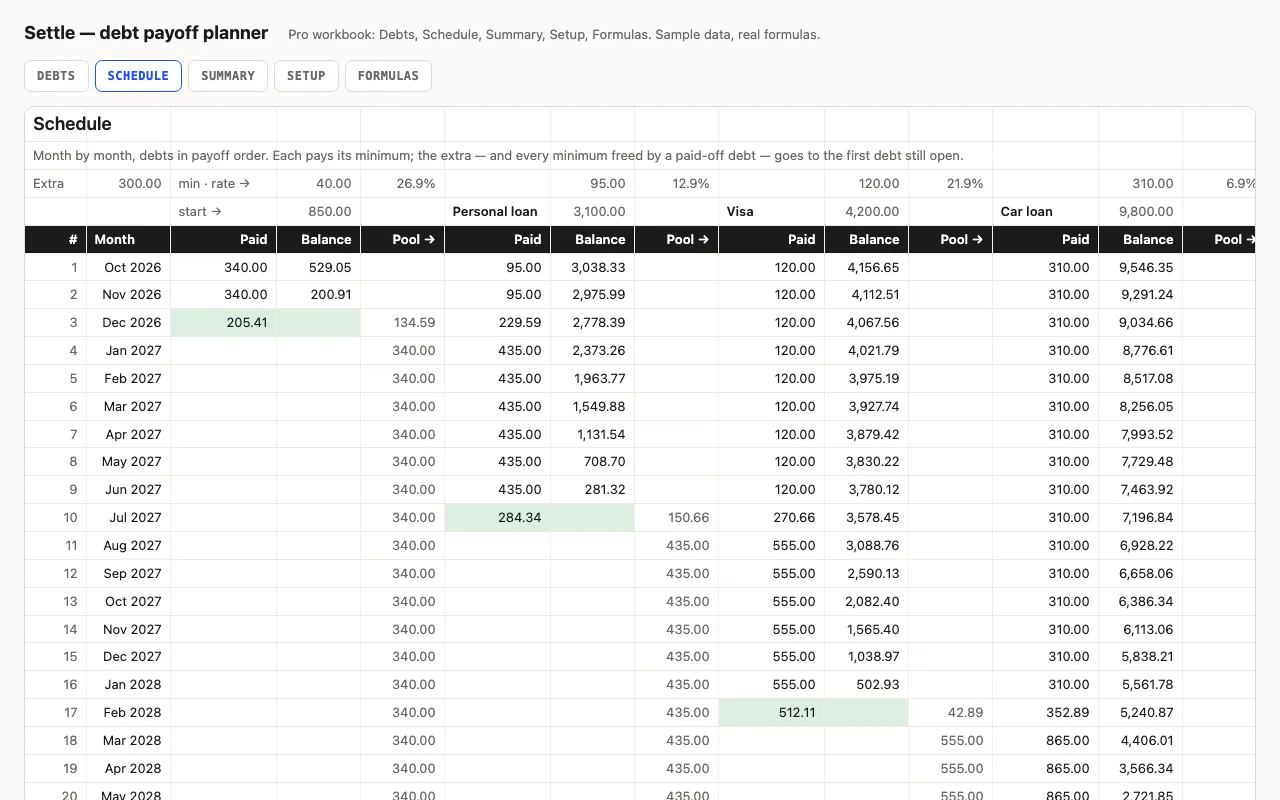
the whole thing. The Schedule sheet puts the debts in payoff order — smallest balance first
for snowball, highest rate first for avalanche — and runs left to right through each month.
Every debt pays its minimum; the extra goes to the first one; when it’s paid, its minimum
and the extra roll to the next. One “Pool →” column per debt carries that money across, so
you can see exactly where each month’s payment went.
Switch the method on Setup and compare: avalanche is never more expensive, snowball clears
the first debt sooner. The Summary puts both numbers — months and interest — next to what
each debt would take on its minimum alone.
Free: the order and the cost
The free Debts sheet gives you the payoff order for either method, the interest each debt
costs per month, and the months to clear each one on its minimum alone — with a red flag
when the minimum doesn’t even cover the interest. That last number is the closed form of an
amortizing loan, −ln(1 − rB/P) / ln(1 + r), written out on the Formulas sheet in Pro.
No RANK, no arrays, no macros
The order is COUNTIF(balances, "<" & this) + COUNTIF(rows above, this) — a rank that
breaks ties by position and works in every app. The schedule’s lookups are INDEX/MATCH on
that order. Nothing here needs Excel 365.
Checked, not just built
The build runs the same payoff in Python — same order, same rounding, same pool — and
compares thirty-six values in both workbooks with LibreOffice and a second engine: the
order under snowball, payments and balances in specific months, the month each debt hits
zero, the interest per debt and in total.