A PO log that answers the two questions
Purchase order tracking comes down to two questions, so that’s what the sheet keeps at the top.
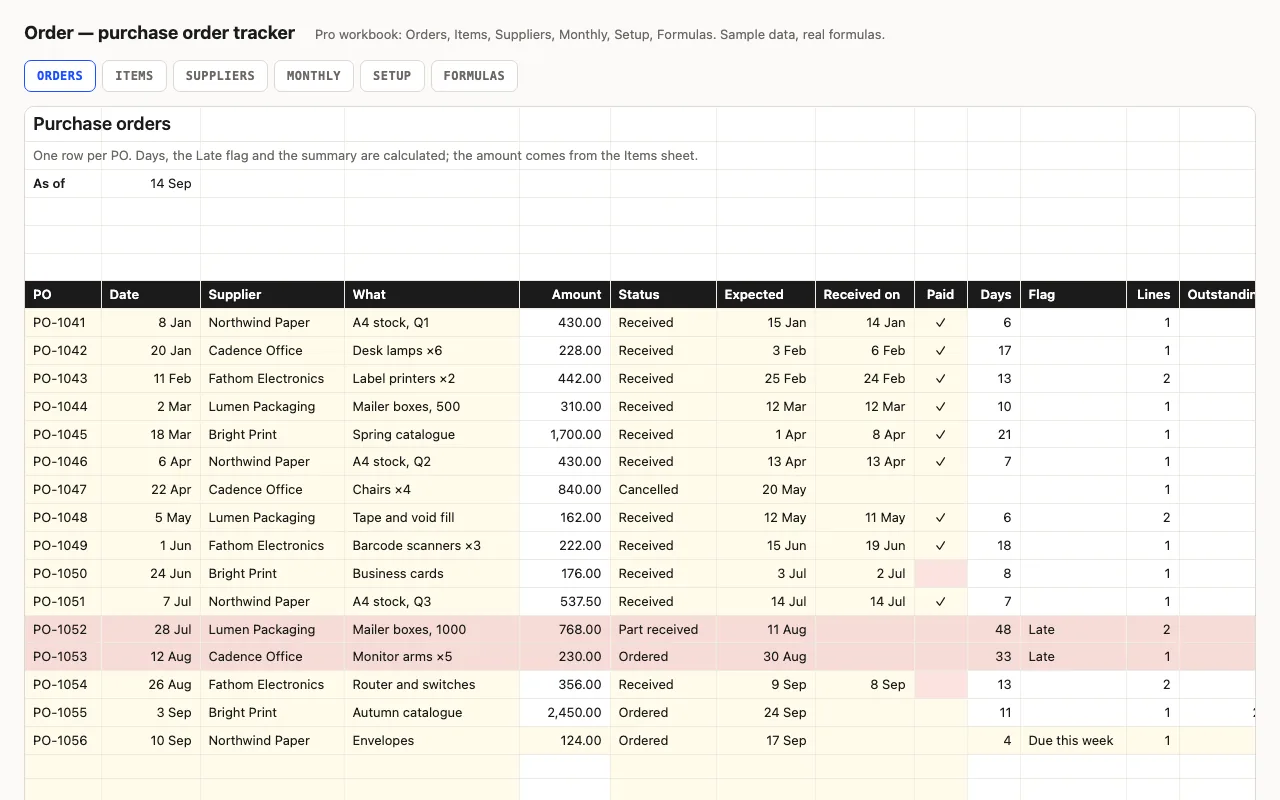
What’s still to arrive, and what have we not paid. The first is the Late flag and the open
value at the top: a PO whose expected date has passed and which isn’t received or cancelled
turns red. The second is received, not paid — the received POs minus the ticked ones, which
is the pile of invoices. Days does double duty: for a received PO it’s the lead time, for an
open one it’s how long it has been waiting, and the average of the first is the number to put
in the next expected date.
Pro: down to the line
Items is one row per line — quantity, unit price, received quantity — and from it the PO’s
amount on Orders becomes a SUMIF, so you stop retyping totals. Outstanding is ordered
minus received, never below zero, and the value still to arrive across every open line is one
SUMPRODUCT that skips cancelled POs. Suppliers puts the same log the other way round: spend
with share bars, what’s open with each, average lead time and who is late right now. Monthly
is ordered by PO date and received by received date, so the two columns don’t have to agree.
Checked, not just built
The build recalculates both workbooks in LibreOffice and in a second, independent engine and
compares fifty-five values — days and flags, every summary figure, PO amounts from the lines,
outstanding quantities, each supplier’s spend and lead time, and the Monthly columns —
against numbers computed outside Excel.