A budget that doesn’t flatter you
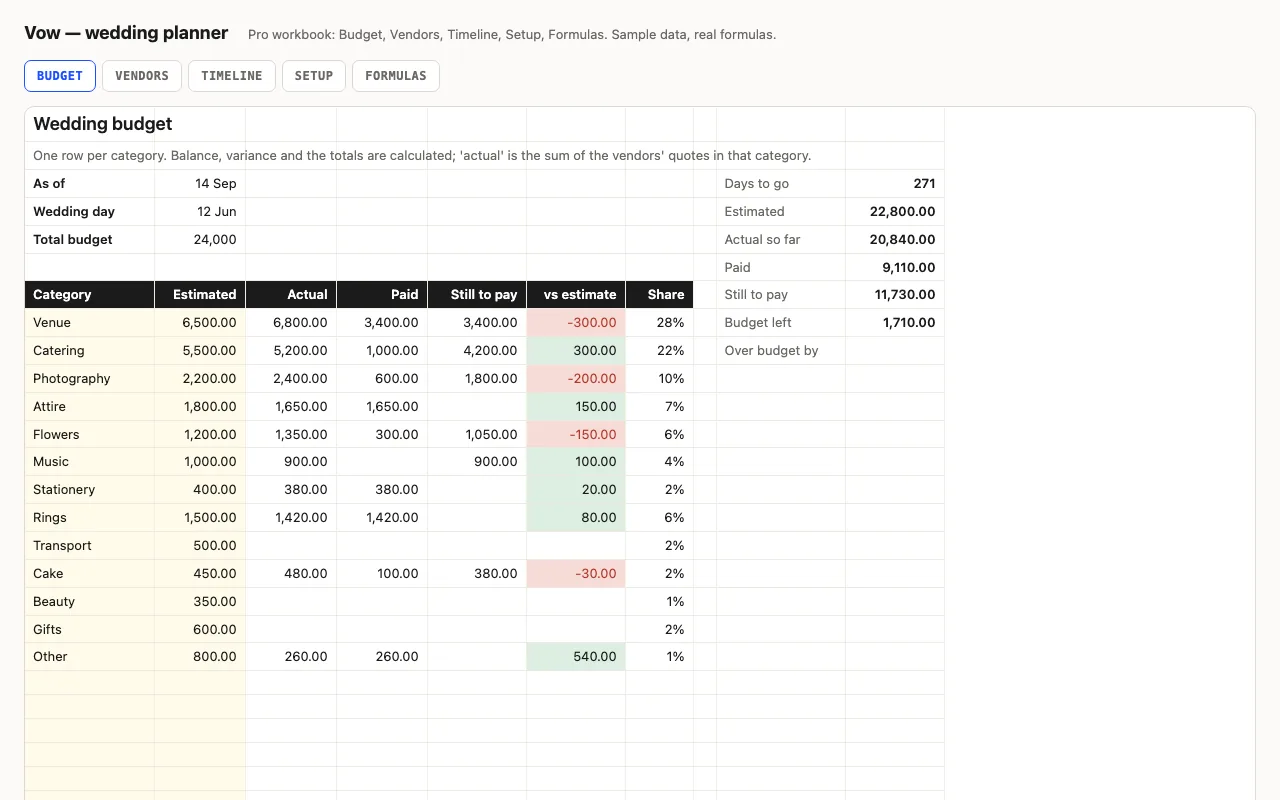
Most wedding budgets look fine until the last three categories get booked. Budget left
here is total budget − actuals − the estimates of everything not yet booked, so the number
only improves when a real quote comes in under plan. vs estimate has the same rule: it
shows nothing until there’s an actual, because an unbooked florist isn’t a saving.
Pro: vendors and the calendar
Vendors is the money side per supplier — quote, contract, deposit, balance-due date, paid —
and the Budget’s actuals become SUMIFs over it, so you stop typing totals twice. The flag
checks things in the order they go wrong: no contract, deposit agreed but not paid, then the
balance-due date against today. Next payment finds the soonest future due date among
vendors still owed by giving every other row a stand-in date inside MIN, then looks up the
vendor — no array entry, works in Excel 2016 and Numbers.
Timeline is tasks by weeks before the day. Move the wedding date on Setup and every due date
moves with it; done tasks strike through, overdue ones turn red.
Checked, not just built
The build recalculates both workbooks in LibreOffice and in a second, independent engine and
compares forty-six values — every total and the budget-left arithmetic in both files, each
vendor’s balance and flag, balances due in 30 days, the next payment, and the timeline’s
dates and statuses — against numbers computed outside Excel.