A tracker, not medical advice
Doses, times and refills come from your prescription and your pharmacist. This file only
remembers what you tell it — it does not prescribe, schedule or check anything. That’s said on
every sheet, not just here.
The week that shows the gaps
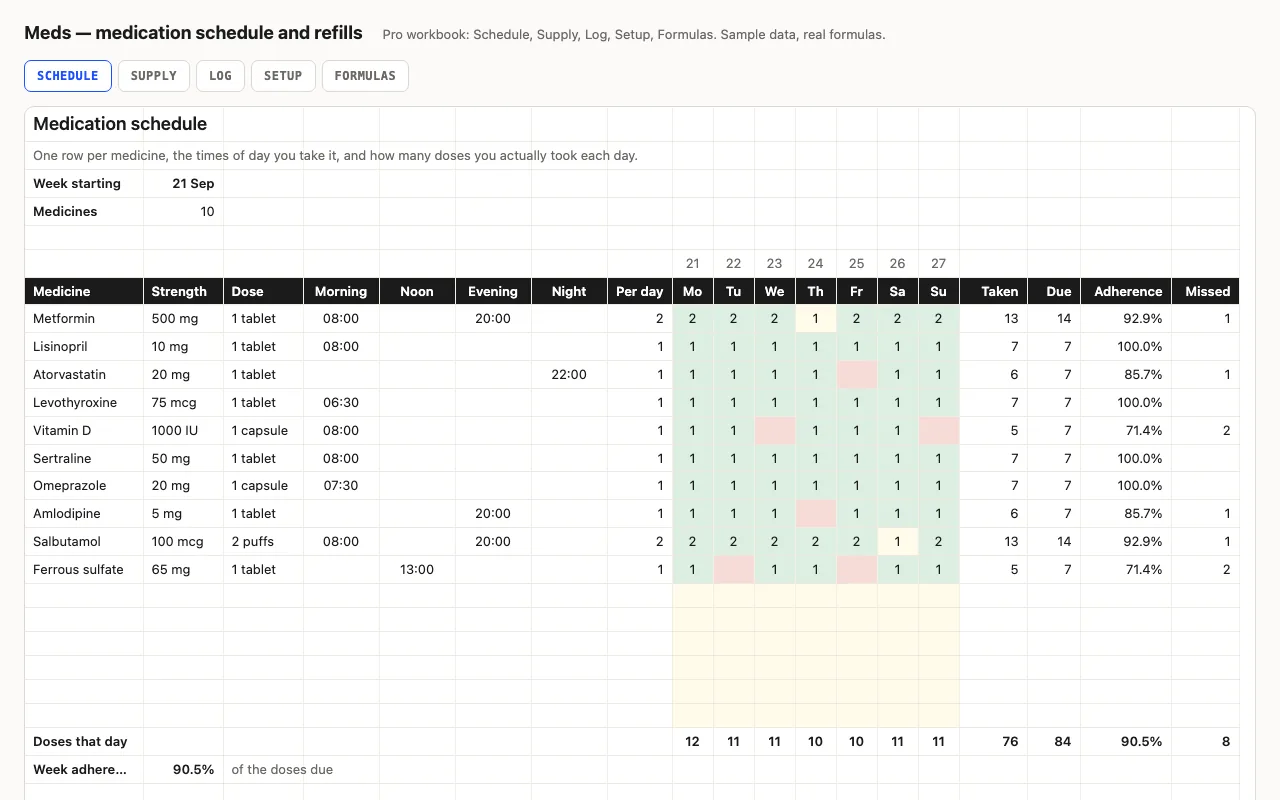
Fill in the times you take a medicine in Morning, Noon, Evening or Night, and doses a day
is however many of those four you filled. Due is that times seven. In the grid you put how many
doses you actually took each day: the cell turns green when it matches the plan, yellow when
it’s short, and red when the day is blank — so a missed row is visible across the sheet rather
than buried in a percentage.
Pro: the refill planner is the useful part
Running out is the failure mode that matters, and the arithmetic is where it usually goes wrong.
Used per day is doses a day × units per dose, so a two-puff inhaler taken twice a day eats
four units, not two. Days left is INT(on hand ÷ used per day) — whole days, because part of a
day is not a day you can take. Runs out is that many days from the week start; Order by is
the run-out date minus the lead days your pharmacy actually needs; and the status reads them
back: inside the lead time it says Order now, within twice it says Soon.
Why the count isn’t COUNTA
COUNTA treats a cell holding a formula that returns nothing as filled — and on the Pro sheet
every one of those cells holds a formula pulling from Setup, so COUNTA would say four doses a
day for every medicine. SUMPRODUCT((D8:G8<>"")*1) counts what’s really there. That one is on
the Formulas sheet, because it will bite anyone who extends the workbook.
Checked, not just built
The build recalculates both workbooks in LibreOffice and in a second, independent engine, then
compares twenty-four values — doses a day, taken, due, adherence and missed per medicine and
for the week, units used a day, days left, the refill status, and the log’s counts per
medicine — against numbers computed outside Excel. It also scans every formula in the file for
error cells.