Why your email breaks in Outlook, and what to do about it
Worked examples of the rules the Word engine throws away, and an email built to survive them — the same in Outlook 2019, Gmail and Apple Mail.
Contents
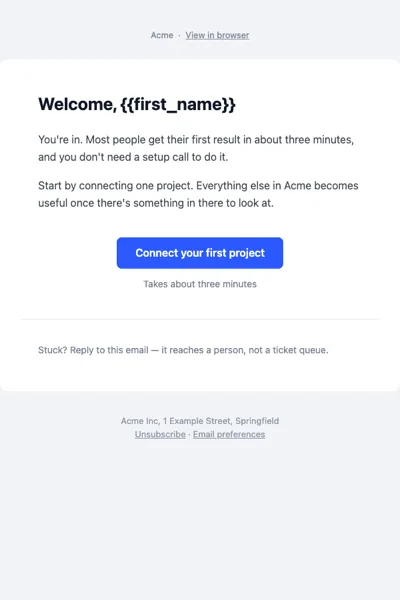
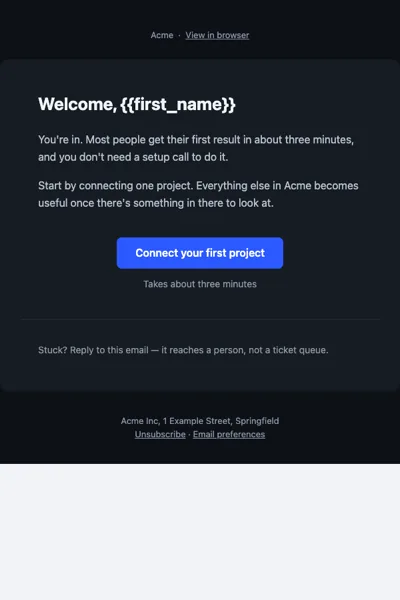
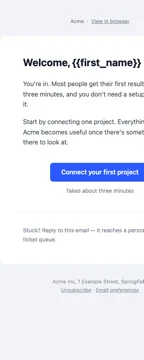
The Word engine instead of a browser
Since 2007, desktop Outlook on Windows has rendered email with the Microsoft Word engine. That is not an old browser — it is a different model. Part of CSS does not exist, part works halfway, and there is no console to tell you which. The practical rule that follows: an email is laid out as a document made of tables, not as a web page.
Everything below is a consequence of that one fact. Gmail and Apple Mail have their own quirks, but Outlook is the client that decides how the structure has to be built.
Tables instead of flexbox
The most common breakage. Two columns built with flexbox look fine in every browser and in Apple Mail, then stack on top of each other in Outlook with the gap gone.
<div style="display:flex;gap:16px">
<div>Left column</div>
<div>Right column</div>
</div>
The working version is a table with role="presentation" — so screen readers do not
announce it as data — and explicit widths on the cells. Spacing goes on the cells as
padding, never on the columns as a gap.
<table role="presentation" width="600" cellpadding="0" cellspacing="0" border="0">
<tr>
  <td width="292" style="padding:0 8px" valign="top">Left column</td>
  <td width="292" style="padding:0 8px" valign="top">Right column</td>
</tr>
</table>
Set the width both as an attribute and, where it matters, in the style. Outlook reads
the attribute; everything else reads the style. The cellpadding="0" cellspacing="0"
pair stops Outlook from adding its own default gaps around every cell.
A button that actually clicks
A button made from a div with rounded corners becomes a square in Outlook, and
sometimes a line of text with the link lost. The reliable version is a link with
padding inside a table cell, plus a VML shape in a conditional comment that only
Outlook sees — that is where the rounded corners and the background live for Outlook.
<a href="…" style="display:inline-block;padding:14px 28px;
background:#2b59ff;border-radius:8px;color:#fff">Get started</a><!--[if mso]>
<v:roundrect xmlns:v="urn:schemas-microsoft-com:vml" href="…"
style="height:48px;v-text-anchor:middle;width:200px" arcsize="17%"
fillcolor="#2b59ff" stroke="f">
<center style="color:#ffffff;font-family:Arial;font-size:16px;font-weight:600">Get started</center>
</v:roundrect>
<![endif]-->
<!--[if !mso]><!-->
<a href="…" style="display:inline-block;padding:14px 28px;background:#2b59ff;
border-radius:8px;color:#ffffff;font-weight:600;text-decoration:none">Get started</a>
<!--<![endif]-->Keep the clickable area at least 44 pixels tall. Most email is read on a phone, and a missed tap on the one button that matters costs you the conversion.
Spacing: padding on the cell
margin on a div or a p is the second most common casualty. Outlook may apply it,
halve it or ignore it, and negative margins collapse to nothing. Padding on a td is
applied consistently by every client, so that is where spacing goes.
<div style="margin:24px 0">Paragraph</div><tr><td style="padding:24px 0">Paragraph</td></tr>The one exception is margin:0 auto to centre a fixed-width container — Outlook does not
use it, but it does not hurt, because Outlook is centring the same content through the
table in the conditional comment.
Background images need VML
background-image on a cell is not drawn by Outlook. If the image is decoration, set a
background-color fallback and accept a flat block in Outlook. If the image has to be
there, wrap it in <v:rect> and <v:fill> inside <!--[if gte mso 9]> — the same
technique as the button, applied to a container.
Dark mode in the inbox
Apple Mail and Gmail respect @media (prefers-color-scheme: dark). Outlook.com does
not read media queries at all; it rewrites colours itself, and the only hook it gives
you is a [data-ogsc] attribute on the body. Desktop Outlook ignores both and stays
light — which is fine, as long as the light version is correct.
@media (prefers-color-scheme: dark) {
.card, .card > table { background: #161b22 !important; }
.title, .title div   { color: #f0f4f9 !important; }
}
[data-ogsc] .card, [data-ogsc] .card > table { background: #161b22 !important; }
[data-ogsc] .title, [data-ogsc] .title div   { color: #f0f4f9 !important; }
Note the > table and div descendants. If you compile from MJML, the class lands on
a wrapper while the colour sits inline on an element inside it — a rule on the wrapper
alone never wins. Target the descendant too, or the card stays white in a dark inbox.
Checklist before sending
- Layout is tables with
role="presentation"; nodisplay:flexorgridanywhere. - Every
<img>haswidthandheightattributes and analt. - The outer table is 600 px wide — Gmail and Outlook preview panes clip anything wider.
- Buttons have a VML twin inside
<!--[if mso]>, and a 44 px tap target. - No
fontshorthand — split intofont-family,font-size,font-weight. - Total HTML under 102 KB, or Gmail clips the message and hides the unsubscribe link.
- There is an unsubscribe link, and it is visible.
- Dark-mode rules cover both
prefers-color-schemeand[data-ogsc].
You can run most of this list automatically: paste the HTML into the email check tool and it flags each item with the line number.