foldout
Free + Pro 4 .docx documents no macros

Invoice, quote, credit note and statement — Word templates

Four .docx documents that print the way they look: an invoice with VAT and payment terms, a quote that expires, a credit note that references the invoice it cancels, and a statement with the debt split by age. No macros, no Word fields that come out as zero somewhere else.

  • DOCX
  • No macros
  • No fields
  • A4 + Letter margins
  • Print-ready

The documents

  1. 01
    Invoice

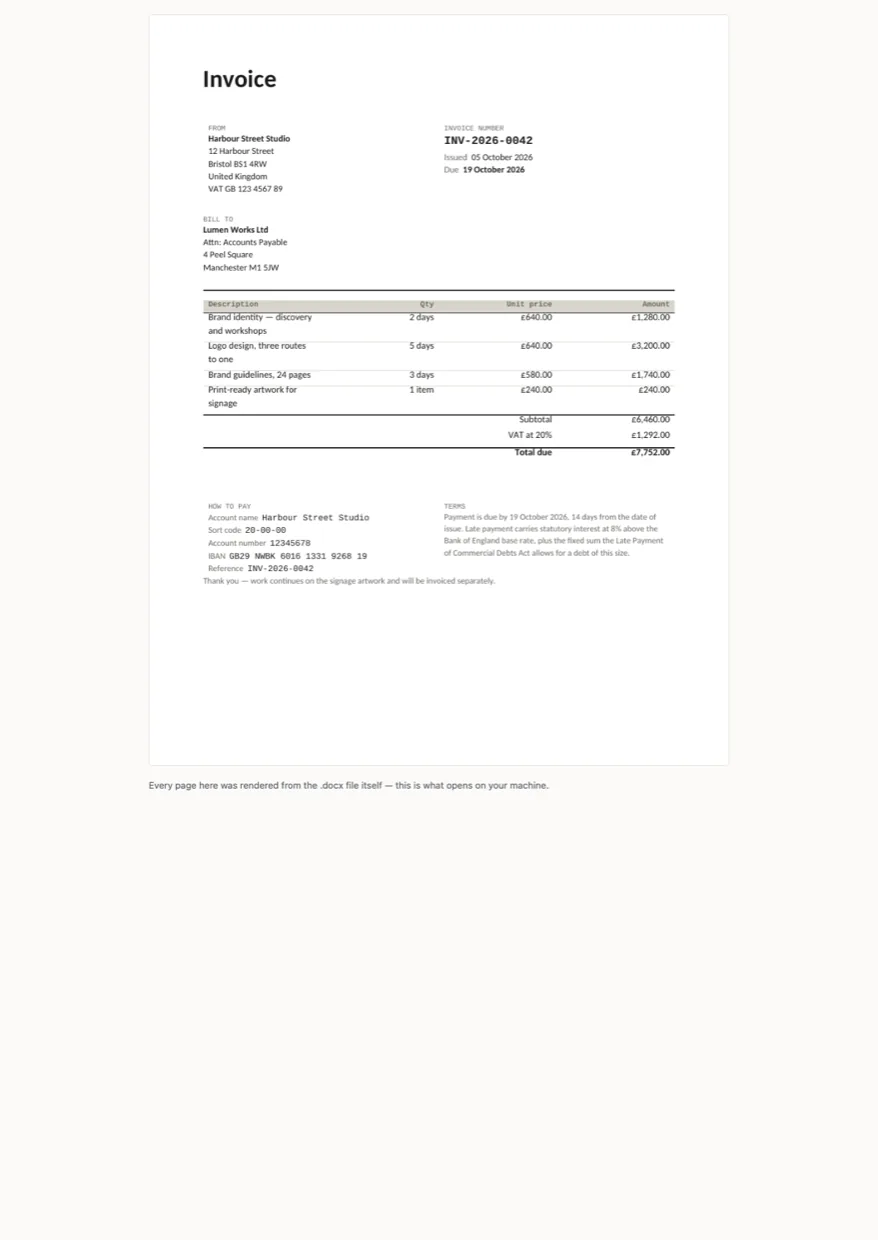
    Your details and the client's, invoice number and date, payment terms and the due date they imply, line items with quantity and unit price, subtotal, VAT, total due, and the bank details underneath. One page.

    Free + Pro
  2. 02
    Quote

    The same paper with the words a quote needs: valid until instead of due, estimated total instead of total due, and a line for the client to accept it.

    Pro
  3. 03
    Credit note

    References the invoice it cancels, carries negative amounts written the way accountants expect (-£1,160.00, not £-1,160.00), and says nothing about a due date, because nothing is due.

    Pro
  4. 04
    Statement of account

    Every open invoice with its date, due date and balance, then the total split by age — current, 1–30, 31–60, 61–90, over 90 days. The letter you send before the one about late fees.

    Pro

Built for

  • Word 2016+
  • LibreOffice Writer
  • Google Docs
  • Pages

Every document is converted to PDF on the build machine and the resulting pages are read back as text, so the build fails if a total, a label or a line item has gone missing. We don't run Word itself there, so this says built for, not tested in — open the pages above to see exactly what prints.

There are no Word fields anywhere in these files. A field like =SUM(ABOVE) shows a stale cached number in Word and a zero in LibreOffice and Google Docs, which is the worst way for a total to be wrong. Every number is typed into the cell, so what you see is what the person receiving it sees.

Pro

$9

Every page, the Pro-only pages, the source files, no attribution, and 12 months of updates and email support.

Invoice with VAT, terms and due date
yes
Quote with a validity date
yes
Credit note against an invoice
yes
Statement with ageing buckets
yes
Credit line in the footer
not required
Updates and support
12 months, email

Licence

Use it for unlimited personal and commercial purposes, including client work.
Do not resell the documents themselves, alone or in a bundle.

Full licence terms →

Paper, not a layout

An invoice is read twice: once on a screen and once on a printer, often by someone’s accounts department. So the whole set is built out of tables with stated column widths and named paragraph styles — no text boxes, no floating logo, nothing anchored to a paragraph that moves when you type. Add three line items and the total moves down with them; it does not land on top of the bank details.

The margins suit A4 and US Letter alike, which is why the type column stops where it does rather than running to the edge of the page.

No fields, on purpose

The usual trick for a total is a Word field — =SUM(ABOVE) in the cell. It is the one thing we refuse to ship. Word shows the number it cached when the file was last saved; LibreOffice Writer and Google Docs show 0. Which means the moment your client opens your invoice in Google Docs, the total reads zero, and you find out when they ask.

Every number here is text in a cell. You type over the sample figures, and the figure you see is the figure they see. The README spells out the three numbers to change on an invoice and how VAT is rounded.

Four documents, one set of blocks

The quote, credit note and statement aren’t restyled copies of the invoice — they are the same header, address and totals blocks with different words. A quote says valid until and estimated total; a credit note says neither, because nothing is due, and it names the invoice it reverses. The statement swaps the line items for a list of open invoices and adds the ageing split, which is the only part of the set with arithmetic worth checking.

Checked by printing it

Every build converts all four files to PDF with LibreOffice and reads the pages back as text. If a total, a label or a line item is missing from the printed page, the build fails and the file never ships. That is also how the Word-field problem was caught: the document looked right on screen and printed a column of zeros.

Need the numbers to add themselves up? Bill is the same invoice as a spreadsheet with a register behind it, and the invoice generator makes a one-off PDF in the browser without any file at all.
Free download

  • invoice.docx
  • README.md · LICENCE.txt

Pro download

  • invoice.docx · quote.docx
  • credit-note.docx · statement.docx
  • README.md · LICENCE.txt (Pro)

Version history

  • 1.0.02026-10-05

    First release

  • 0
    macros
  • 0
    Word fields
  • 4
    documents
  • 1
    page each

Related documents

Tell us what happened

Goes straight to a person. No account, no ticket number.

What is this about?

We keep the message and the page it came from. Nothing else — not your IP, not your browser. Privacy.